
Domains and DNS
A domain is usable only after being verified. Verification does not stop at checking that the name exists: it proves that a request to the domain reaches this node, whatever path it takes.
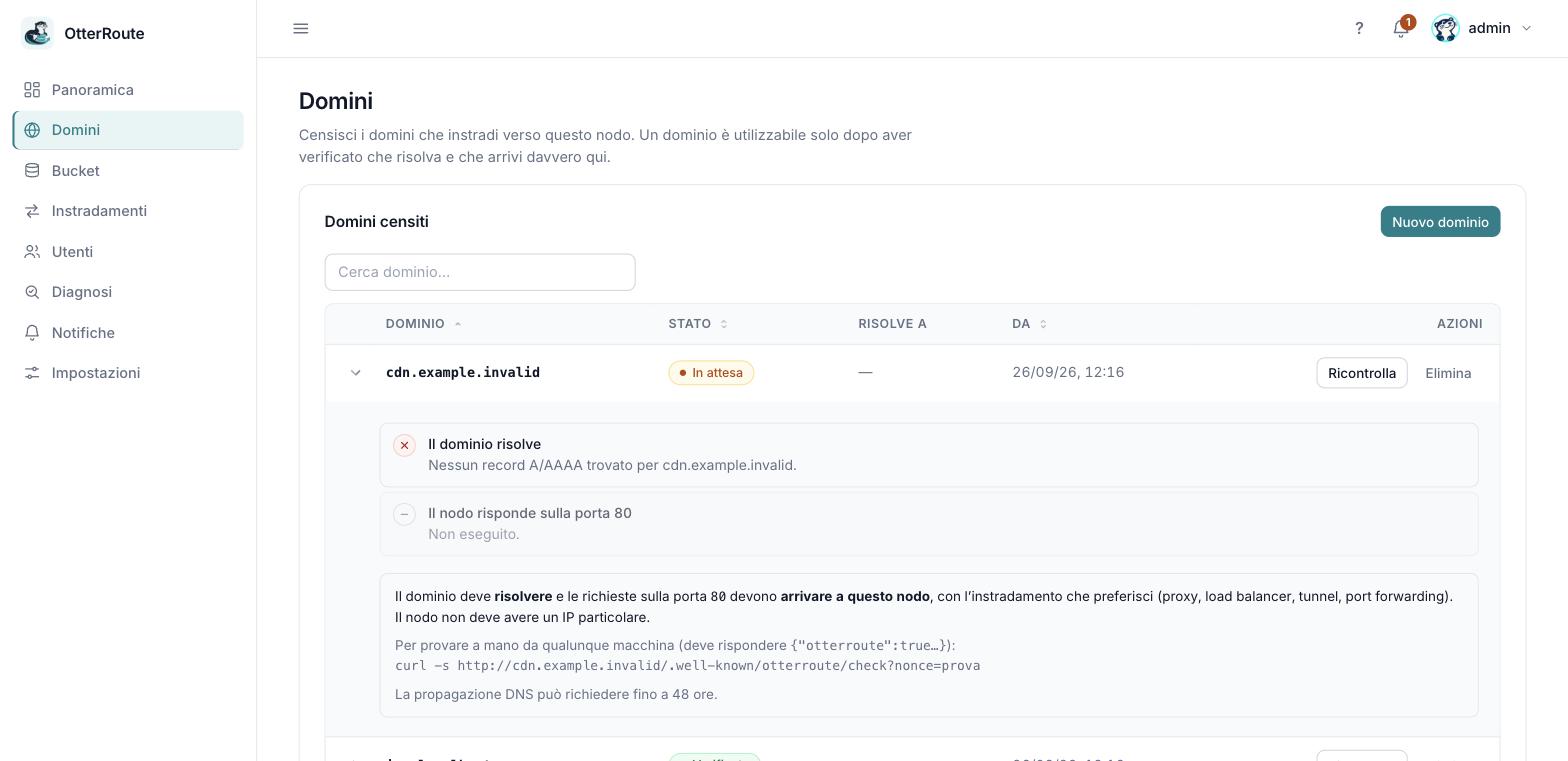
A pending domain: the DNS step fails and the second is skipped · 26/09/2026
What verification checks
For each domain the panel runs in sequence:
| Step | What it does | If it fails |
|---|---|---|
| 1. The domain resolves | Queries DNS for A/AAAA records. It uses the system DNS servers but not /etc/hosts, and asks for the name as absolute (with the trailing dot) so search domains do not alter the result. | No record found: the record does not exist or has not propagated yet. |
| 2. The node answers | Makes an HTTP request to the addresses found, with the domain's Host header, to the test page /.well-known/otterroute/check and verifies a proof signed with the node's identity. | No answer, or another server answers. |
The test page is served by every node for any host, before the rules. You can repeat the same request by hand from any machine:
curl -s http://media.company.com/.well-known/otterroute/check?nonce=test
# {"otterroute":true,"proof":"…"}
It does not matter where the node is
The node can have a public or private IP, sit behind NAT, a proxy, a CDN or a load balancer: if a request made to the domain reaches it, the domain is valid. You do not need to tell the panel its IP.
Which records to create
DNS must bring the domain name to your entry point: the node's IP, or that of the proxy/CDN/load balancer in front of it.
| Situation | Record |
|---|---|
| Subdomain → fixed IP | A (IPv4) and/or AAAA (IPv6) to the address |
| Subdomain → another name | CNAME to that name |
Main domain (apex, e.g. company.com) | a CNAME is usually not allowed: use an A/AAAA record, or ALIAS/ANAME/CNAME flattening if the provider offers it |
| Behind a CDN/proxy (e.g. Cloudflare) | the record the provider indicates, with the proxy on or off according to its rules |
Each provider has its own peculiarities (apex limits, proxy, minimum TTLs): the sheets are in DNS providers.
Propagation and timing
A new record can take up to 48 hours to be visible everywhere, and usually much less. It depends on the record's TTL and on how long resolvers remember a negative answer. For this reason:
- A new domain stays Pending, not in error: this is normal.
- The node rechecks by itself: every 5 minutes for pending or failed domains, every 15 for verified ones. You do not need to stay on the page.
- You can force a check with Recheck from the domain row.
To see what a public resolver answers, without your computer's cache:
dig +short A media.company.com @1.1.1.1
dig +short CNAME media.company.com @8.8.8.8
dig +trace media.company.com          # follows the chain to the authoritative servers
Domain states
| State | Meaning | What to do |
|---|---|---|
| Pending | Never verified. | Create the record and wait for propagation. |
| Verified | It resolves and the request reaches the node. | You can use it in routes. |
| DNS error | It was valid and no longer resolves (or no longer leads here). Rules already created keep being served. | Check the DNS record: expired, changed or deleted. |
| Node unreachable | It resolves, but the request does not reach the node. | Check proxy, firewall, port forwarding, entry port. |
If a verified domain fails, the node retries after a few seconds before declaring the error, so an isolated timeout does not raise false alarms. States also appear as alerts in the panel's bell.
The entry port
The check makes an HTTP request to the standard port 80. If your setup changes the port (for example a proxy that accepts on 80 and forwards to 8080) the verified port remains 80; if instead the entry point is another port, change it in Settings → HTTP. The port the node listens on is set with OTR_LISTEN.
HTTP to HTTPS redirect
The check does not follow redirects. If your proxy or CDN answers 301/302 to HTTPS on every HTTP request, verification reports "another service answers (status 301)". Let only the /.well-known/otterroute/check path through over HTTP (see HTTPS and proxy).
Local domains for trying things
Names ending in .localhost (img.localhost) are always valid: browsers resolve them by themselves to 127.0.0.1 and the panel considers them verified without checks. They are only for trying things locally. They do not work from another machine, and do not use .local: it goes through mDNS and on your computer it does not point to 127.0.0.1.
If something does not add up
Look at the domain details page (the three rows with the steps) and the table in troubleshooting.