
Notifications
The node can alert you by email and Telegram when a domain or a bucket stops working, and when it is back. This way you do not need to keep the panel open. They are configured from Notifications in the menu (the notifications:manage scope is required, by default only the Administrator has it).
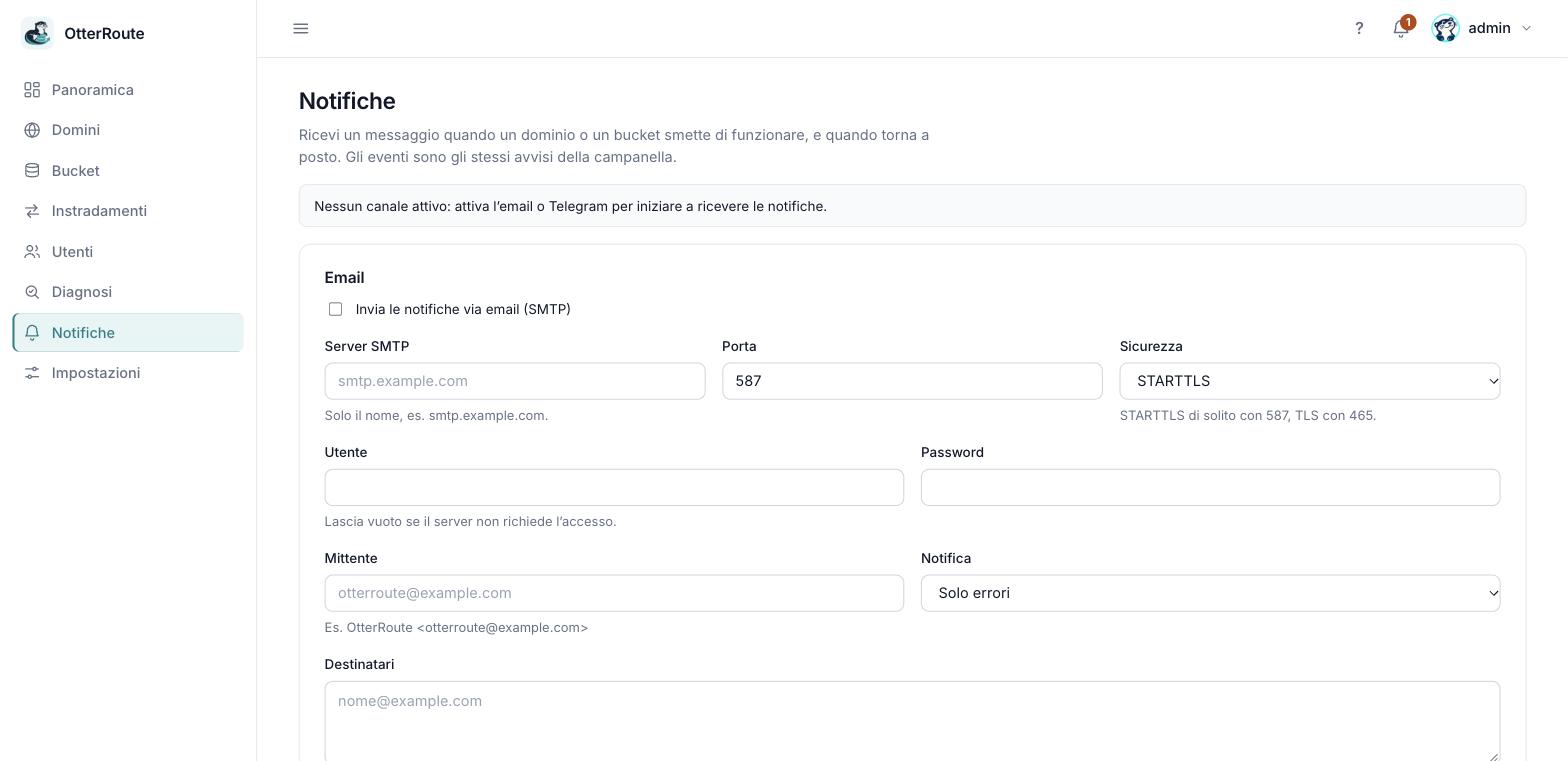
The Notifications page: channels, thresholds and rules · 26/09/2026
What is notified
The same alerts as the panel's bell:
| Level | When |
|---|---|
| Error | A domain that was valid no longer resolves or no longer leads to the node; a bucket is unreachable; the storage rejects the credentials or the read; a certificate has expired; an update failed and the node rolled back. |
| Warning | A new domain is still waiting for DNS propagation; a bucket has not been verified yet; the test file is missing; a certificate expires within 14 days (automatic renewal failed, or it was uploaded by hand and you must renew it); a new version is available. |
They are not notified at every check, only when the state changes:
- Problem: an error or warning appears and remains beyond the configured delay.
- Worsening: a warning becomes an error (the delay starts again).
- Reminder: optional, every N hours while the problem stays open.
- Recovered: the problem is gone (only if you had already received it).
Thresholds, delay and recovery
- Threshold per channel: Errors only or Warnings and errors. Each channel has its own: for example Telegram for everything, email only for errors.
- Delay before notifying (default 10 minutes): a problem that clears earlier, like an isolated timeout or a newly added domain, generates no messages. The node rechecks domains and buckets every 5 minutes (15 if already verified), so with the default delay the first message arrives 10–15 minutes after the failure. With
0it arrives at the first check that detects it. - Reminder (default off): repeats the message every N hours.
- Recovery (default on): sends a message when everything is back to normal.
The state of already-notified problems is saved to disk: after a node restart you do not get duplicate messages.
Telegram
- On Telegram open @BotFather, send
/newbotand follow the instructions: you get the bot's token. Treat it like a password. - Write a message to your bot (or add it to a group and write there): a bot cannot write first to a user.
- Find the chat id by opening, replacing the token, this address in the browser:
curl -s "https://api.telegram.org/bot<TOKEN>/getUpdates"In the result look for "chat":{"id":…}: that number is the id (negative for groups). For a public channel you can use @channelname, as long as the bot is an administrator of it. getUpdates does not work if a webhook is attached to the bot. 4. In the panel paste the token, enter one chat per line, choose the threshold, save and press Send test.
Email (SMTP)
You need an SMTP server, a user and a password (or a local relay with no login), a sender and one or more recipients (maximum 10).
| Security | Typical port | Notes |
|---|---|---|
| STARTTLS | 587 | The connection starts in clear and upgrades to TLS. |
| TLS | 465 | TLS from the start. |
| None | 25 | Only for a relay on your own network: credentials would travel in clear. |
Settings of the most common services, from their documentation (verified on 2026-09-26; we have not tested them with real accounts):
| Service | Server | Security and port | Login |
|---|---|---|---|
| Gmail / Google Workspace | smtp.gmail.com | STARTTLS 587 or TLS 465 | Full address + app password; "less secure apps" have not been supported since 1 May 2025. |
| Aruba | smtps.aruba.it | TLS 465 | Full mailbox address + password. Alternatively smtp.aruba.it port 587. |
| Microsoft 365 | smtp.office365.com | STARTTLS 587 (465 is not supported) | Microsoft is retiring SMTP login with username and password and recommends OAuth, which OtterRoute does not support: with Microsoft 365 use a relay or another SMTP service. |
Sources — verified on 2026-09-26
Tests and the log
Send test sends a real message and shows the result immediately, with the server's error if it fails (a single attempt, at most one test every 10 seconds). Before testing you must save the settings.
Real sends make up to 3 attempts. The Latest notifications list shows the last 50 sends, with the error for failed ones. If the last send of an active channel failed, an alert appears in the bell.
Security
- The SMTP password and the Telegram token are in a file readable only by its owner, in the state folder; the panel never shows them after saving (leaving the field empty keeps the saved ones).
- The token does not appear in errors or logs.
- Changes to notifications go into the activity log, without the secrets.
- The message contains a link to the panel only if you set
OTR_PUBLIC_URL.
Limits
- Notifications leave from the node: if the node is off nothing arrives. Also monitor
/healthzfrom outside. - Only SMTP email with a password and Telegram: no OAuth, no other services.
- Events are domains and buckets: there are no notifications yet for access security or traffic.