
Diagnosis
When a file does not open, the Diagnosis page follows the request's path and tells you where it stops and what to do. Just paste the file's address, for example https://cdn.example.com/photos/boat.jpg (the routes:read scope is required). From a route's row, the Diagnosis button opens the page already filled in.
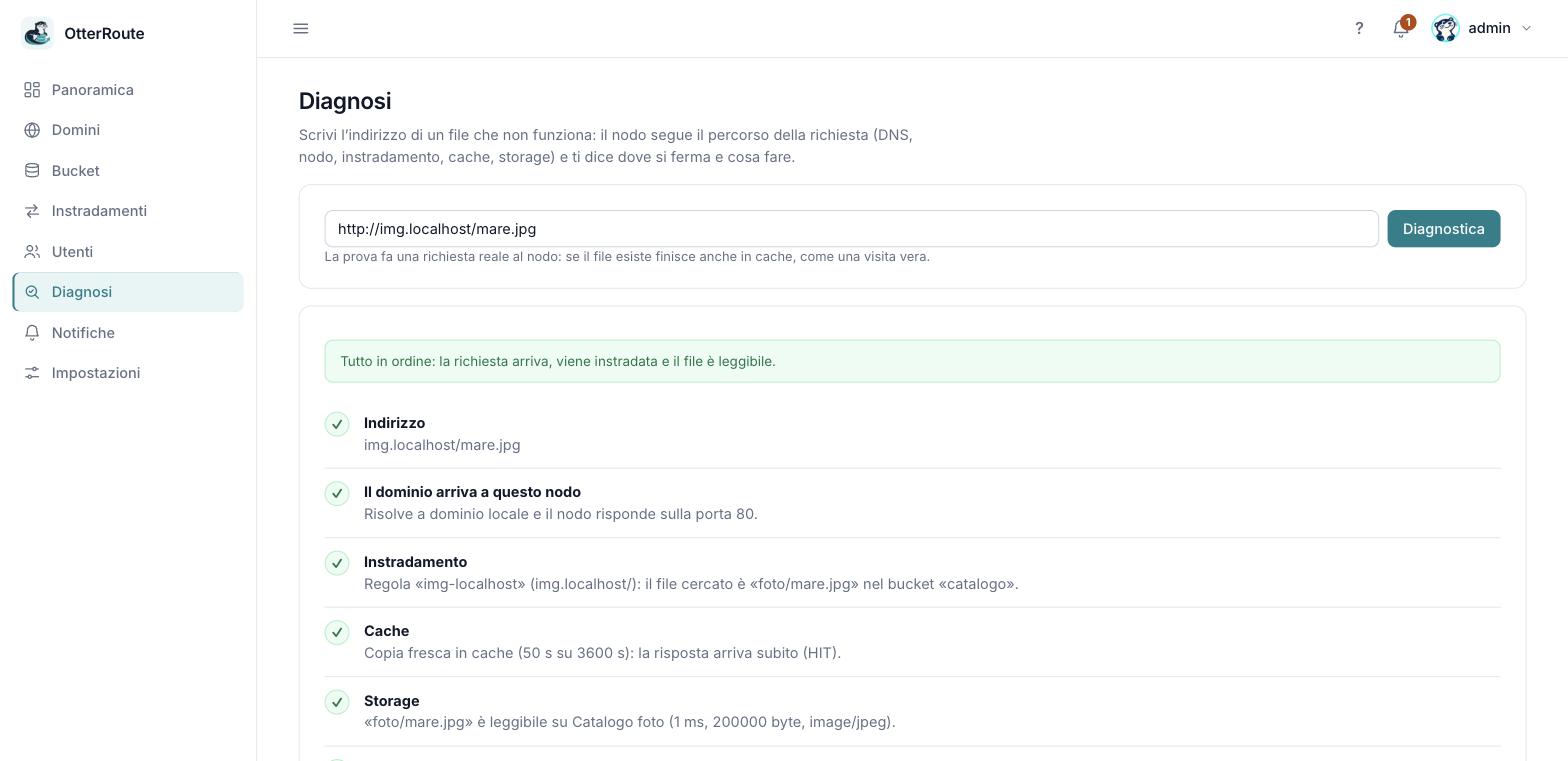
Diagnosis of a file: every step with its result · 26/09/2026
The steps
| Step | What it checks | If it fails |
|---|---|---|
| Address | That it is a valid URL. With https:// it checks that the node has a certificate for the domain and is listening for HTTPS; otherwise it warns that HTTPS depends on a proxy in front. | Fix the address. |
| The domain reaches this node | The same check as domain verification: the name resolves and an HTTP request to the domain reaches this node. It warns if the domain works but is not a registered domain. | DNS records, firewall, proxy: see Domains and DNS. |
| Route | Which rule serves the path (the longest prefix wins) and which file it looks for in the bucket. If there is none, it lists the domain's prefixes. | Create the route or use an existing prefix. A path ending in / is a folder: it is not listed. |
| Cache | Whether the file is already in cache, fresh or expired, or whether a "not found" is remembered. | If the file now exists, wait for the negative cache or purge it. |
| Storage | Actually reads the file from the bucket with the saved key: time, size, type. It tells apart a missing file, rejected credentials, an unreachable storage. | See S3 buckets and Troubleshooting. |
| Node response | A real request to the node: HTTP status, X-Cache and time. | Look at the node's logs. |
The first failing step is the most likely cause: later steps that depend on it are skipped. Every problem has a What to do box.
The test is a real request
The last step asks the node for the file as a visitor would: if it exists it ends up in cache. It changes nothing in the storage.
The report
Copy report puts a text in your clipboard with the address, the node, the date, the result of each step and the fix, to paste into a bug report or a chat. It contains no keys or other secrets: only the results.
Limits
- The diagnosis starts from the node: it sees DNS and the network as it sees them, which can differ from how your browser sees them (local DNS cache, VPN,
/etc/hosts). - With a hand-written configuration the storage check is not available (the panel does not have the keys).
- It does not follow query parameters and does not test HTTPS: if the proxy in front of the node is the cause, it only says so as a warning.